
TCP health
Handshake failures, refused connections, resets, retransmissions, zero windows, duplicate ACKs, round-trip time and server response time.
Open source · MIT license
Every packet tells a story. PacketStory turns .pcap and .pcapng captures into a ranked, plain-English troubleshooting report: what is broken, why, and what to do next.
How it works
One file or several. PacketStory reads .pcap and .pcapng, on any port and any IP protocol.
You get a health score from 0 to 100 and a list of problems, with the worst at the top.
Every problem comes with a suggested next step and the exact connections it affects.
What it checks
Handshake failures, refused connections, resets, retransmissions, zero windows, duplicate ACKs, round-trip time and server response time.
SNI, ALPN, TLS 1.3 detection, a missing ServerHello, deprecated versions and alerts. Add an SSLKEYLOGFILE to check decrypted certificates for expiry and name mismatch.
MSS-implied MTU, fragmentation-needed messages, detection of path MTU black holes and the distribution of frame sizes.
TCP, UDP, DNS over UDP and TCP, DHCP, ICMP and ICMPv6, and ARP, including DNS queries that never got an answer.
Compare captures taken at different points, or merge them into a single timeline to follow one conversation across the path.
Save the findings and the TCP flow table as CSV, ready for a ticket, a spreadsheet or a change record.
Sample output
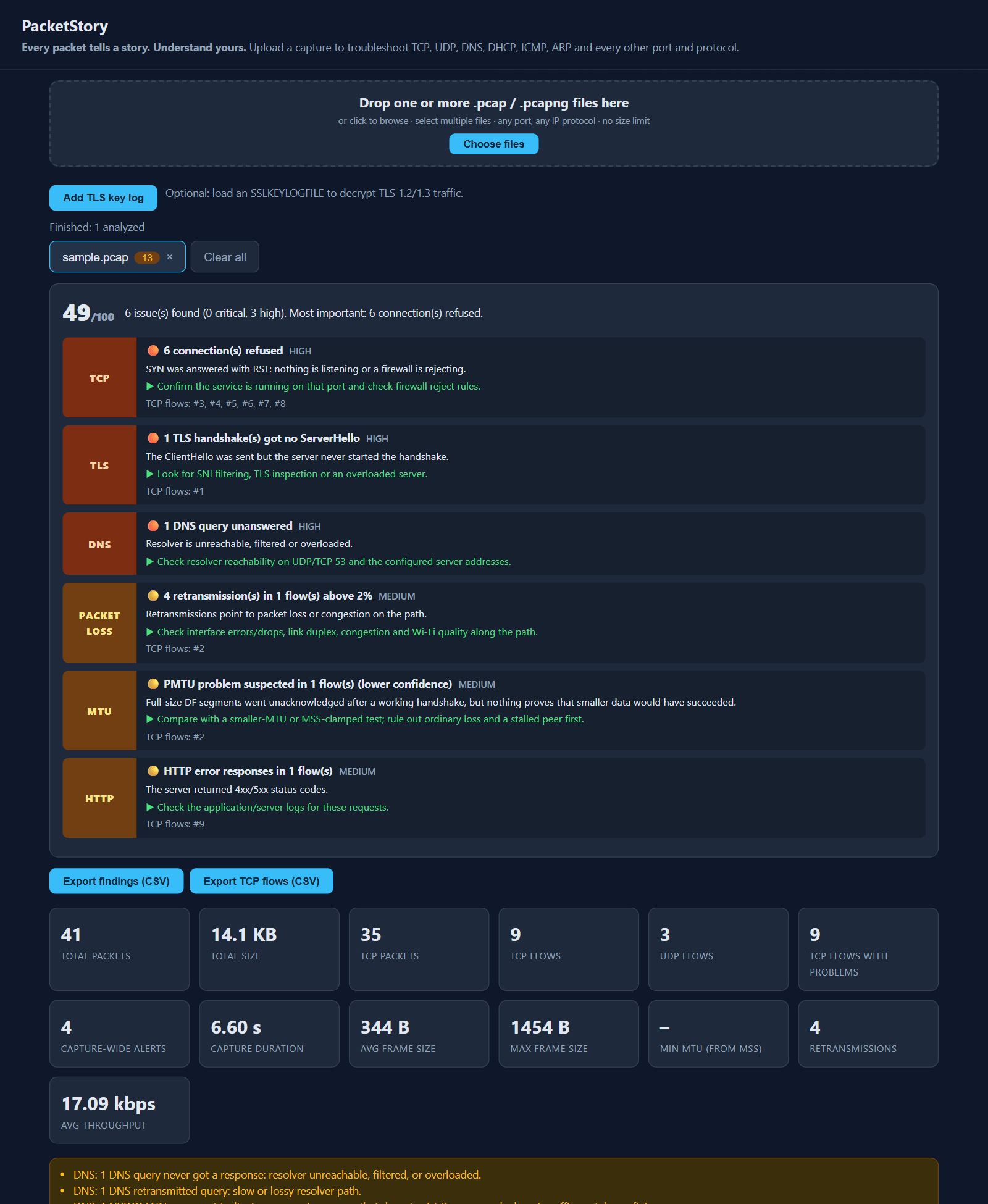
These are the six findings from the screenshot above, in PacketStory's own words. The capture is a small synthetic sample.
| Area | Finding | What PacketStory saw | Suggested next step |
|---|---|---|---|
| TCP | High 6 connections refused | SYN was answered with RST: nothing is listening or a firewall is rejecting. | Confirm the service is running on that port and check firewall reject rules. |
| TLS | High 1 handshake got no ServerHello | The ClientHello was sent but the server never started the handshake. | Look for SNI filtering, TLS inspection or an overloaded server. |
| DNS | High 1 query unanswered | Resolver is unreachable, filtered or overloaded. | Check resolver reachability on UDP/TCP 53 and the configured server addresses. |
| Packet loss | Medium Retransmissions above 2% in 1 flow | Retransmissions point to packet loss or congestion on the path. | Check interface errors and drops, link duplex, congestion and Wi-Fi quality along the path. |
| MTU | Medium PMTU problem suspected, lower confidence | Full-size DF segments went unacknowledged after a working handshake, but nothing proves that smaller data would have succeeded. | Compare with a smaller-MTU or MSS-clamped test; rule out ordinary loss and a stalled peer first. |
| HTTP | Medium Error responses in 1 flow | The server returned 4xx/5xx status codes. | Check the application and server logs for these requests. |
Install
PacketStory\PacketStory.exePython 3.10 or newer. No third-party packages are required. Installing cryptography is optional and enables TLS decryption.
git clone https://github.com/prawinnetsecdevops-creator/PacketStory.git
cd PacketStory

python app.py                             # desktop window
python analyzer_backend.py                # local web UI at 127.0.0.1:8000
python analyzer_backend.py a.pcap b.pcap  # JSON on the command line

python -m unittest discover -s tests -v   # run the tests
Roadmap
PacketStory is honest about what it cannot see yet.
Bug reports and ideas are welcome on GitHub. Please share only captures you are authorized to share, with sensitive data removed.